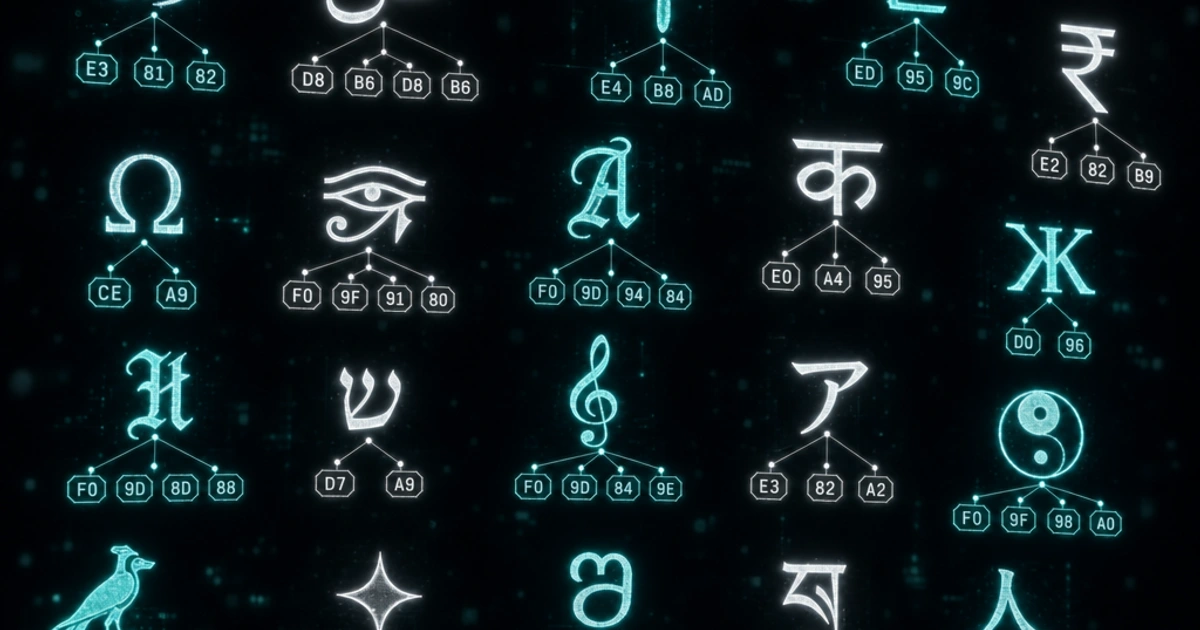
Before Unicode, every region of the world solved text encoding independently. Japan had Shift-JIS. Russia had KOI8-R. Western Europe had ISO 8859-1. Receive a file encoded in one standard and open it in software expecting another, and you'd get garbage characters — a phenomenon known as mojibake. Unicode was designed to end this. UTF-8 is how we got there.
ASCII: A Good Start That Wasn't Enough
ASCII (American Standard Code for Information Interchange) was defined in 1963. It assigns numbers 0–127 to the characters needed for English text: uppercase and lowercase letters, digits, punctuation, and control characters. One byte can hold values 0–255, so ASCII only uses the lower half.
That works fine as long as you're writing in English. The moment you need accented characters (é, ñ, ü), Cyrillic, Arabic, Chinese, or anything outside basic Latin, you're out of range. ASCII has no character for them.
Various 8-bit encodings tried to extend ASCII by using bytes 128–255 for regional characters. ISO 8859-1 (Latin-1) covered Western European languages. ISO 8859-5 covered Cyrillic. Each used those upper 128 bytes differently. A document labeled "ISO 8859-1" and a document labeled "ISO 8859-5" both use byte value 0xE9, but it represents é in one and щ in the other.
This is why encoding metadata matters. Without knowing which encoding a file uses, you're guessing.
Unicode: The Universal Character Set
Unicode doesn't define how bytes are stored. It defines a code point — a unique number — for every character in every writing system on Earth, plus symbols, emoji, and a lot more.
The Unicode standard, maintained by the Unicode Consortium, currently assigns code points to over 150,000 characters across more than 160 scripts. Code points are written as U+ followed by a hexadecimal number. The letter A is U+0041. The euro sign € is U+20AC. The grinning face emoji is U+1F600.
Code points range from U+0000 to U+10FFFF — that's just over 1.1 million possible positions, of which approximately 155,000 are currently assigned (leaving room for future characters).
Unicode solves the identity problem. Every character has exactly one code point, globally unique, stable once assigned. But it doesn't say how to store those numbers in bytes — that's what the encoding schemes handle.
UTF-8: Variable-Width Encoding
UTF-8 is the dominant encoding for Unicode text on the web and in most modern systems — formally specified in RFC 3629. The clever part is how it maps code points to bytes.
UTF-8 uses 1 to 4 bytes per character, determined by the code point's range:
| Code point range | Bytes used | Bit pattern |
|---|---|---|
| U+0000 – U+007F | 1 | 0xxxxxxx |
| U+0080 – U+07FF | 2 | 110xxxxx 10xxxxxx |
| U+0800 – U+FFFF | 3 | 1110xxxx 10xxxxxx 10xxxxxx |
| U+10000 – U+10FFFF | 4 | 11110xxx 10xxxxxx 10xxxxxx 10xxxxxx |
The lead byte tells you how many bytes follow: a byte starting with 0 is a single-byte character. A byte starting with 110 means two bytes total. 1110 means three. 11110 means four. Continuation bytes always start with 10.
'A'  → U+0041 → 0x41         (1 byte: 01000001)
'é'  → U+00E9 → 0xC3 0xA9    (2 bytes)
'€'  → U+20AC → 0xE2 0x82 0xAC  (3 bytes)
'😀' → U+1F600 → 0xF0 0x9F 0x98 0x80  (4 bytes)
You can verify any character's UTF-8 encoding manually: find the code point in the table, fill in the x bits, and convert to hex. The Base64 Encoder and URL Encoder both work at the byte level and will show you the percent-encoded form, which directly reveals each byte.
Why UTF-8 Won
UTF-8 has a property that made adoption practical: it's ASCII-compatible. Any valid ASCII text is also valid UTF-8 — the byte sequences are identical. A file that only uses bytes 0–127 is both ASCII and UTF-8 simultaneously.
This meant UTF-8 could be adopted incrementally. Existing ASCII software didn't need to change to handle UTF-8 files that only contained ASCII characters. As more characters were needed, they used the multi-byte sequences, which older software would just pass through without mangling.
UTF-8 is also self-synchronizing. If you start reading a byte stream in the middle, the lead byte structure tells you where the next character boundary is. You never need to scan backward. This makes error recovery and stream processing simpler.
For English text, UTF-8 is the same size as ASCII. For most other Latin-script languages, it's 1–2 bytes per character. Chinese, Japanese, and Korean characters typically take 3 bytes each. Emoji take 4 bytes.
UTF-16 and When It's Used
UTF-16 uses 2 bytes for most characters and 4 bytes (a surrogate pair) for code points above U+FFFF.
Historically, UTF-16 was adopted by Windows and Java when the plan was that 2 bytes would be enough for all Unicode characters — what was then called "Unicode" was UCS-2, a fixed-width 2-byte encoding. When the Unicode range was extended beyond 65,536 code points, UCS-2 had to be updated to UTF-16 with surrogate pairs, adding complexity.
JavaScript strings are internally UTF-16. str.length in JavaScript counts UTF-16 code units, not characters. Emoji and supplementary characters take 2 code units (a surrogate pair), so '😀'.length === 2 even though it's one character. The newer String.prototype.codePointAt() and iteration with for...of handle surrogate pairs correctly — see MDN's `codePointAt()` reference for the gotchas.
Windows APIs, the .NET runtime, and the Java runtime all use UTF-16 internally. Files exchanged between systems generally use UTF-8, but in-memory string representations vary.
The BOM Problem
A Byte Order Mark (BOM) is the code point U+FEFF placed at the very beginning of a text file. For UTF-16, it's necessary — the byte order (big-endian vs little-endian) affects how the 2-byte sequences are read, and the BOM tells the reader which order to expect.
For UTF-8, a BOM is meaningless (UTF-8 has no byte order issue) but some Windows tools write it anyway. This causes problems: a UTF-8 file with a BOM has three invisible bytes (EF BB BF) at the start. Programs that don't expect a BOM — particularly on Linux and macOS — can misinterpret these bytes or include them in the first line.
The classic symptom: a CSV file opens correctly in Excel (which writes BOM-marked UTF-8) but a Python script produces a UnicodeDecodeError or weird first-row content when read on Linux. The fix is to write UTF-8 without BOM, or explicitly handle the BOM when reading.
# Read UTF-8 with or without BOM
with open('file.csv', encoding='utf-8-sig') as f:  # 'utf-8-sig' strips BOM
    content = f.read()

# Write UTF-8 without BOM
with open('output.txt', 'w', encoding='utf-8') as f:
    f.write(content)
Mojibake: When Encodings Collide
Mojibake (文字化け) is the Japanese term for the garbled text that appears when content encoded in one system is interpreted as another. The word literally means "transformed characters."
A common modern example: a MySQL database column using latin1 (ISO 8859-1) storing UTF-8 bytes. The character é is stored as bytes 0xC3 0xA9 (UTF-8), but MySQL reads them as two latin1 characters: à and ©. The text looks correct when written but appears as é when read.
The fix is almost always to declare encodings explicitly at every layer: the database column, the database connection charset, the HTTP response headers (Content-Type: text/html; charset=utf-8), and the HTML meta tag (<meta charset="UTF-8">). Inconsistency anywhere in the chain causes mojibake.
Practical Rules for Today
Use UTF-8 everywhere unless you have a specific reason not to. Most modern systems default to it, but being explicit beats relying on defaults:
- Set
<meta charset="UTF-8">in every HTML document — the WHATWG HTML spec requires UTF-8 for new documents - Specify
charset=utf-8in HTTPContent-Typeheaders - Store text in databases as
utf8mb4(notutf8, which in MySQL only supports 3-byte sequences and can't store emoji) - Open and write files with an explicit encoding rather than relying on system defaults
For more on how encoding interacts with encryption and hashing — three concepts that work at the byte level and are often confused — see Encoding vs Encryption vs Hashing. For how number representations connect to byte values, Number Systems Explained covers the hex-to-byte connection that makes percent-encoding and UTF-8 byte sequences readable.
FAQ
What's the difference between Unicode and UTF-8?
Unicode is the standard that assigns a unique code point (like U+1F600) to every character. UTF-8 is one of several encodings that converts those code points to bytes. Unicode is the abstract identity; UTF-8 is the concrete representation. Other encodings of Unicode include UTF-16 and UTF-32, but UTF-8 dominates the web and most modern systems.
Why does MySQL's `utf8` not actually mean UTF-8?
MySQL's utf8 only supports 3-byte UTF-8 sequences (up to U+FFFF), missing 4-byte sequences like emoji and supplementary characters. The full UTF-8 in MySQL is utf8mb4 (mb4 = "multibyte 4"). Always use utf8mb4 for new databases. The utf8 charset is kept for backward compatibility but should be considered deprecated.
Why is my emoji showing as `?` or boxes?
Three common causes: (1) the database column is utf8 instead of utf8mb4 (MySQL truncates 4-byte sequences), (2) the connection charset doesn't match the column charset (mojibake), (3) the font being rendered doesn't include the emoji glyph. Check the byte representation with a hex dump — if the bytes are correct, it's a font issue.
Should I write UTF-8 with or without BOM?
Without BOM, almost always. UTF-8 has no byte-order ambiguity, so the BOM serves no purpose — it just adds 3 invisible bytes (EF BB BF) that confuse Linux/macOS tooling. Excel insists on writing BOM-marked UTF-8 for CSV files; in Python, use encoding='utf-8-sig' to strip it transparently when reading those files.
Is UTF-8 backwards compatible with ASCII?
Yes — that's why UTF-8 won. Any valid ASCII file (bytes 0-127 only) is also valid UTF-8 with the same byte sequence. This let UTF-8 be adopted incrementally: existing ASCII processing code didn't need to change to handle UTF-8 files that only contained ASCII characters. UTF-16, by contrast, is not ASCII-compatible.
Why does `'😀'.length === 2` in JavaScript?
JavaScript strings are internally UTF-16, and length counts UTF-16 code units, not characters. Emoji like 😀 (U+1F600) are above U+FFFF and require a "surrogate pair" of two UTF-16 code units to represent, so length returns 2. Use [...str].length or Array.from(str).length to count actual characters (code points).
Should I use UTF-16 instead of UTF-8?
Almost never for storage or transmission. UTF-16 is bigger for ASCII-heavy text (most web content), has byte-order ambiguity (BOM required), and isn't ASCII-compatible. UTF-16 only makes sense for systems that are already deep into it (Java, .NET, Windows internals). For files, networks, and modern programming languages, UTF-8 is the answer.
How can I tell what encoding a file uses?
Look for a BOM at the start, check Content-Type headers if it's HTTP, or use file --mime-encoding on Linux/macOS. For HTML, check <meta charset>. There's no foolproof detection — a file using only ASCII characters could be ASCII, UTF-8, or any ISO 8859 variant. Always declare encoding explicitly in metadata; don't rely on detection.